Types of Trigger in Zorcha Custom Flow Builder
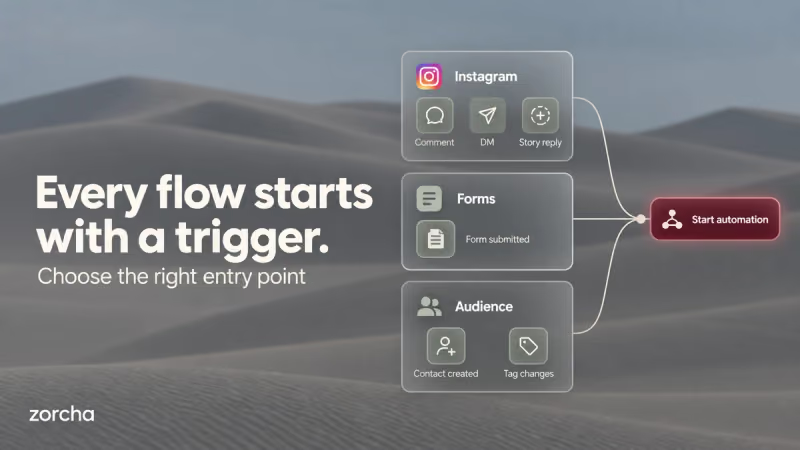
Every flow in Zorcha's Custom Flow Builder starts the same way: something happens on Instagram, and that event opens the door to everything that follows. That single event is the trigger, and it's the first decision you make when building a flow, and the one that's easiest to get wrong.
Pick the wrong trigger, and the right message ends up in front of the wrong audience, or never fires at all. A comment trigger and a DM trigger might sound similar, but they bring people in at completely different points of intent.
This guide breaks down all trigger types inside Zorcha's Flow Builder, including the difference between those two, so you know exactly which one fits before you build anything.
TL;DR
- A trigger is the event that starts a flow; every automation in Zorcha begins with one.
- Zorcha offers various trigger types across three categories: Instagram interactions, form submissions, and audience events.
- Comments, DMs, and Story replies can all be filtered by keyword, so the same trigger type can power very different flows.
- Contact Is Created and Tag Added/removed based on changes to your audience, not on a specific post or DM.
- A single flow can run on more than one trigger using Add Trigger, so different entry points lead into the same automation.
Why the Trigger Matters
The trigger decides who gets into the flow, and that decision can't be undone once they're in. Set it too broadly, and everyone who comments, including someone just saying “nice reel!”, enters the automation.
The fix is matching the trigger's intent level to what the flow is for. A general comment trigger suits a giveaway where every comment should count. A keyword-specific DM trigger suits a pricing inquiry where only serious replies should move forward.
Click Start with a trigger on the canvas, and a panel opens on the right showing every trigger grouped into three categories: Instagram, Forms, and Audience. Here's what each one does.
Also read: The link in bio strategy that actually converts (no more dead clicks)
Types of Triggers in Zorcha’s Custom Flow Builder
.png)
The Various types of triggers in Zorcha’s Custom Flow Builder are:
1. Instagram Triggers
Four of the seven trigger types fire directly from activity on Instagram, comments, DMs, Story replies, and ad responses.
- Comments on Post or Reel
Comments on Post or Reel fires when someone leaves a comment on a post or reel you've published. When you set it up, you choose between any post, where every comment on anything you publish triggers the flow, or a specific post or reel, picked from a preview grid of your content.
From there, you set the keyword, either any keyword, which fires on every comment, or specific keywords like “sales guide,” which only fire when someone types that exact phrase. A publicly reply toggle sends a visible reply back under the comment in addition to the private DM, which is useful for showing activity on the post itself.
- Sends You a DM
Sends you a DM when someone messages you directly with a keyword, set up the same way as the comment trigger, any keyword or specific ones. The difference is intent: someone commenting might just be reacting to a post, but someone typing into your DMs has already decided to start a conversation, which makes this trigger suited to direct inquiries like pricing or availability.
- Replies to a Story
Replies to a Story fire when someone responds to one of your Instagram Stories. You can set it to any story, or pick a specific one from a grid of story thumbnails, and add a keyword filter if you only want certain replies to count. Leaving it open means any text reply to that story fires the flow.
Story replies tend to come from your most engaged followers, since replying takes more effort than a like or a comment. That makes this trigger a strong fit for time-sensitive moments, a flash sale, a poll result, or a product drop, where the people replying are already paying close attention.
- Replies to an Ad
Replies to an AD fire when someone responds to the DM conversation started by an Instagram ad. It's built specifically for paid campaigns, so the flow it triggers can pick up exactly where the ad's promise left off. If the ad offered a discount code, the flow can deliver it the moment someone replies.
2. Forms Trigger
Submits a Form fires when a contact fills out an Instagram form connected to your account. Unlike the Instagram triggers, this one hands the flow structured information from the start, whatever fields the form collected, like a name, email, or budget range, so the flow can branch or personalize based on real data rather than just a keyword.
3. Audience Triggers
The last two trigger types don't depend on what someone does under a post or inside a DM; they fire based on changes to your audience list itself.
- Contact Is Created
Contact Is Created fires the moment someone becomes a new contact in Zorcha for the first time, regardless of which Instagram interaction brought them in. That makes it the natural starting point for a welcome sequence that should apply to every new contact, no matter how they arrived.
- Tag Added or Removed from Contact
Tag Added to Contact and Tag Removed from Contact fire when a specific tag is added to or taken off someone's profile in your Audience section. Since tags are usually applied based on what someone has done, bought a product, joined a waitlist, or gone cold, these triggers turn those moments into the start of a new flow.
Add the tag “purchased” after a sale, and a post-purchase sequence can begin automatically. Remove the tag “active” after a period of inactivity, and a re-engagement flow can pick it up from there.
Also read: How to set-up AI FAQ automation for Instagram business accounts
Triggers at a Glance
Here's how all seven trigger types compare side by side:
Trigger Type | What Fires It | Setup Options | Audience Intent | Best Use Case |
Comments on Post or Reel | Comment on a selected post or reel | Any/specific post; any/specific keyword; public reply toggle | Medium–High | Resource drops from a post or reel |
Sends You a DM | DM containing a keyword | Any/specific keyword | High | Pricing or direct inquiries |
Replies to a Story | Reply to a selected Story | Any/specific story; optional keyword | Very High | Time-sensitive offers, launches |
Replies to an Ad | Reply to an ad DM | Linked to an ad campaign | High | Paid campaign follow-ups |
Submits a Form | Form submission | Select the form | High | Lead capture with form data |
Contact Is Created | New contact added to Zorcha | None, automatic | New | Welcome sequences |
Tag Added/Removed | Tag change on a contact | Select tag + direction | Varies | Re-engagement, lifecycle, post-purchase |
Also read: What are the best Instagram story automation tools for lead capture in 2026
Conclusion
Every flow starts with one of these seven triggers, and the right one comes down to matching its intent level to what the flow needs to do: a comment trigger for broad reach, a DM trigger for direct intent, a Story reply for your most engaged followers, or an audience trigger for moments that happen outside of any single post.
Once that choice is made, everything else in the flow builds on top of it; the messages, the conditions, and the delays all assume the trigger has already done its job of bringing the right person in.
Open the Custom Flow Builder inside Zorcha, click Start with a trigger, and pick the one that matches where your audience already is.
FAQs
1. What is a trigger in Zorcha's Flow Builder?
A trigger is the specific event, on Instagram, a form, or your audience list, that starts a flow. Comments, DMs, Story replies, form submissions, and tag changes are all examples.
2. What's the difference between the Comments trigger and the DM trigger?
Comments fire from public activity under a post or reel, so they can come from anyone just browsing. DMs fire from someone already messaging you directly, which usually signals a stronger intent.
3. Can one flow run on more than one trigger?
Yes, using Add Trigger. A flow can start from a comment, a DM, or both, and every entry point leads into the same sequence.
4. Can I add a keyword filter to every trigger type?
Comments, DMs, and Story replies all support keyword filters. Submits a Form, Contact is Created, and the tag-based triggers don't use keywords; they fire from form data or audience changes instead.
5. Is there a trigger for when someone unfollows you?
Not as its own trigger. The closest option is Tag Removed from Contact if you're tagging contacts based on follow status.
6. Which trigger should I use for a giveaway?
Comments on Post or Reel with any keyword work best, since it counts every comment on the post as an entry without requiring an exact word.