How to Build Timed and A/B Tested Instagram DM Flows
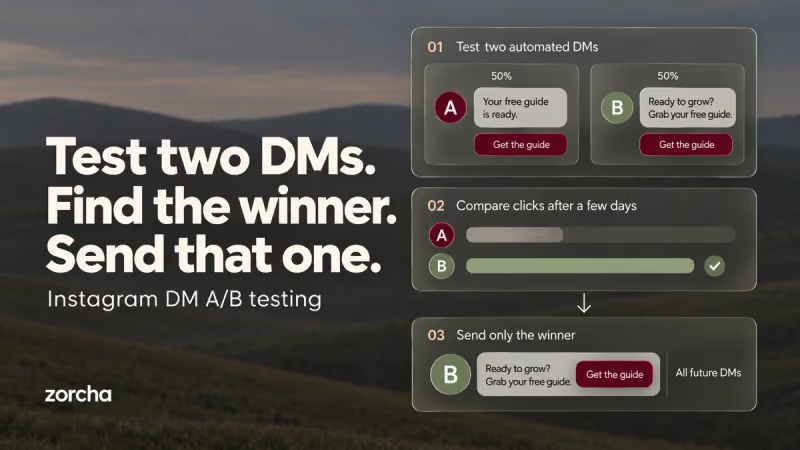
Most flows are built around what the message says. Fewer are built around when it arrives or which version of it someone actually sees. Those two variables, timing and variation, are what Smart Delay and Randomize control, and they sit right next to each other in the Logic section of the Add Step panel.
Smart Delay handles the when. Randomize handles which version. Together, they give a flow a level of precision that a single, static DM sequence never could, and they’re the reason a well-built flow can feel like a real person paying attention, rather than software firing on a schedule.
TL;DR
- Smart Delay pauses the flow for a set number of hours or minutes before the next step fires, adding a human-feeling gap between messages.
- The right delay depends on context; freebie follow-ups sit at 2 hours; re-engagement nudges often need 2–3 days.
- Randomizer splits contacts into weighted groups and sends each group down a different path, making A/B, or A/B/C/D, testing possible inside one flow.
- Each Randomize variation needs its own complete path. The percentage split controls how many contacts experience each version.
- Used together, Smart Delay and Randomize in Zorcha Custom Flow Builder let you test both the message content and its timing in a single flow.
What is Smart Delay in Zorcha Custom Flow Builder?
Smart Delay inserts a timed pause between two steps, so the next action in the flow doesn’t fire the moment the previous one completes.
When a contact reaches a Smart Delay node, the flow stops for them at that point. It waits for the configured time, then moves them forward to whatever step comes next: a DM, a Condition check, or another Logic node. Nothing goes out during the wait. The contact simply sits at that node until the delay expires.
That waiting period is doing more work than it might appear.
Setup
.png)
.png)
To add a Smart Delay, click Add Step on the canvas, go to Logic, and select Smart Delay. The node appears on the canvas, and the panel on the right opens with two inputs: a number field and a unit dropdown that toggles between hours and minutes. Type the number, set the unit, and the delay is configured.
The node on the canvas sits between the step before it and the step after it, visually showing exactly where in the sequence the pause lives.
Timing by Use Case
Different sequences call for different gaps; here’s a starting point for the most common ones.
- Freebie follow-up: 2 hours. Long enough for the person to open the guide and form a first impression, short enough that your follow-up still connects to the moment they asked for it.
- Webinar reminder: 24 hours before the event, then 1 hour before. The first reminds them they signed up; the second lands while the event is close enough to act on.
- Sales sequence second message: 4–6 hours. Gives the first pitch room to breathe without letting the conversation go cold.
- Welcome sequence day-2 message: 24 hours. Space the onboarding out so it feels like a conversation over time rather than a batch of messages arriving at once.
These aren’t fixed rules. The right delay for a specific audience is something Randomizer can help test.
Also read: How to use condition step in Zorcha flow builder - Step-by-step guide
During the Delay Window
Each contact who reaches a Smart Delay node runs their own individual countdown from the moment they arrive, not from when the flow first went live. Someone who comments at 9 am and someone who comments at 3 pm are on separate timers, and the follow-up goes out two hours after each of them specifically.
If a contact blocks the account or unsubscribes from communication during the delay window, the flow stops for that person before the next step fires. The delay doesn’t override a contact’s ability to exit the sequence; it just determines when the next step would have run had they stayed in it.
What is Randomizer in Zorcha Custom Flow Builder?
Randomizer splits the contacts moving through a flow into weighted groups, each of which continues down a different path. The split isn’t random in the sense of unpredictable; it’s controlled. You set the percentages, and the flow distributes contacts accordingly.
The purpose is testing. When the same type of contact, coming in through the same trigger, gets two different experiences, you can see which one produces a better result. That result becomes the standard, and the losing version gets retired.
This is the difference between guessing which DM works better and actually knowing.
Setup and Configuration
.png)
.png)
Add Randomize the same way as any other Logic step: click
Add Step → Logic → Randomize.
The panel opens with two default variations, A at 25% and B at 75%, each with a slider. Adjust the sliders to set the split you want. Click Add Variation to create a third or fourth path for A/B/C or A/B/C/D testing.
On the canvas, the Randomize node splits into multiple outgoing arrows, each labeled with its percentage, each leading to its own Add Step button. Every path after Randomize is independent; Path A and Path B can have completely different messages, different delays, and different conditions, with no overlap between them.
Each variation needs its own complete path. If Path A has two steps after it, Path B needs two steps as well, even if the content differs entirely.
What’s Worth Testing
The most useful A/B tests change one thing at a time, so the result points back to a single cause. Here are five variables that regularly produce meaningful differences in DM flows.
- Opening line tone: a casual opener versus a more direct one, keeping everything else identical. Tone shifts conversion more than most creators expect.
- File attachment vs button-only CTA: one path delivers the guide as a PDF inside the DM; the other sends a button that links out to it. The friction of clicking vs. the immediacy of a direct file changes how people engage.
- Button label copy: “Get the guide” versus “Send it to me”. The first is descriptive; the second is action-led. Small copy changes on buttons move click rates more than paragraph rewrites.
- Short DM vs longer DM: three lines versus eight lines covering the same offer. Some audiences want the context; others want to get to the link.
- Emoji vs no emoji: the same message with emoji markers versus clean text only. Emoji usage affects whether a message reads as personal or promotional, and that perception changes by audience.
Test one of these per Randomize split. Testing two variables at once makes it impossible to know which one drove the difference.
Reading Results and Shifting the Split
A test is only useful when it ends. Running a 50/50 split indefinitely means the losing version keeps going out to half the audience indefinitely.
Watch whichever action the flow is designed to produce: button taps, replies, link clicks. Once the pattern is clear and the volume is large enough to be confident in it, shift the split toward the winner. If Path B consistently outperforms Path A, move from 50/50 to 20/80, then remove the Randomize node entirely once you’re ready to commit to Path B as the standard.
There’s no fixed rule for how long to run a test before deciding. A flow on a high-traffic trigger with hundreds of contacts per day can surface a clear winner in a week. A lower-traffic flow might need a month. The question is whether the difference in performance is consistent, not just whether one is higher on a given day.
Also read: 7 types of triggers in Zorcha custom flow builder explained
Using Smart Delay and Randomize Together
Each feature is useful on its own. Together, they answer a question that neither can answer alone: which message, sent at which time, works best?
A Randomize node at 50/50 splits contacts into two groups. Path A sends a casual, short DM and then hits a Smart Delay of 1 hour before a follow-up. Path B sends a longer, more detailed DM and hits a Smart Delay of 3 hours before the same follow-up. Now both the message and the timing are being tested simultaneously, on the same audience, in the same flow.
Eg: A finance creator using this setup could test whether a voice note follow-up after 2 hours outperforms a text follow-up after 4 hours, for the same free budget tracker they sent initially. Once the winning combination is clear, they remove the Randomize node, set the Smart Delay to whichever timing won, and the flow runs on that standard from that point on.
The key is keeping the Condition, trigger, and first DM identical on both paths, so the only variables are the ones being tested. Everything else being equal is what makes the result meaningful.
Real-World Examples
Course Creator Testing a Freebie DM
A course creator drops a reel about productivity systems and adds a comment trigger on the keyword SYSTEM. Everyone who comments enters the flow and immediately receives the free PDF guide.
A Randomize step at 50/50, then splits the audience. Path A gets a three-line follow-up two hours later: punchy, no explanation, just a button. Path B gets a six-line follow-up at the same delay: what the paid course covers, a social proof line, and then the button.
After three weeks, Path B’s button gets clicked at a meaningfully higher rate. The creator shifts the split to 10/90 for a few more days to confirm, then removes the Randomize node and runs Path B as the standard. The test took three weeks and cost nothing except the setup time.
E-Commerce Brand Running a Sequence
A skincare brand posts a reel about a new serum. A DM trigger on the keyword SERUM fires when someone messages that word, and the flow sends an instant DM with a card showing the product image, a two-line description, and a Shop Now button.
A Smart Delay of 4 hours follows. After the delay, a short follow-up goes out: “Hey, just checking in. Did you get a chance to look at the serum? Here’s a 10% code if you want to grab it today.”
A second Smart Delay of 20 hours comes after that. If the contact still hasn’t tapped the button (tracked through a condition-checking engagement), a final message goes out acknowledging that the code is expiring soon.
Three messages, two delays, one purchase window, and none of it required a single manual reply from the brand.
Also read: What is Zorcha custom flow builder? A complete overview of every feature inside it
Conclusion
Smart Delay and Randomize solve two problems that matter more than most people realise when they’re building their first flow. Smart Delay makes the sequence feel like a real conversation rather than a batch job. Randomize replaces guesswork about what’s working with actual data from an actual audience.
Used together, they turn a flow from something that sends messages on autopilot into something that actively learns which messages land best and when. That’s the difference between automation that runs and automation that improves.
Ready to build a flow that gets smarter over time? Get started with Zorcha today and set up your first Smart Delay or Randomize step in minutes.
FAQs
1. Can I set Smart Delay in minutes instead of hours?
Yes. The configuration panel has a unit dropdown that switches between hours and minutes, so you can set delays as short as a few minutes if the flow calls for it.
2. Does Smart Delay affect every contact in the flow at the same time?
No. Each contact runs their own individual countdown from the moment they reach the Smart Delay node. Two people who enter the flow six hours apart will hit the follow-up six hours apart, each on their own timeline.
3. How many variations can I add in a Randomize step?
The Add Variation button lets you add a third, fourth, or more paths beyond the default two, so A/B/C or A/B/C/D testing is possible in the same flow. Each variation needs its own complete path connected after it.
4. What should the percentage split be when starting an A/B test?
50/50 is the standard starting point because it gives both versions an equal chance and surfaces a result faster. Once a winner is clear, shift the split toward it, 70/30 or 80/20, before removing Randomize entirely.
5. Can I use more than one Smart Delay in the same flow?
Yes. Multiple Smart Delays can sit at different points in the same flow, each with its own timing. A common pattern is a short delay before a follow-up and a longer delay before a final re-engagement message, both in sequence.
6. If both paths in a Randomize test have the same Smart Delay, am I really testing anything?
Only if the messages differ. The value of Randomize comes from at least one variable being different between paths. If the delay and the message are both identical, the paths are the same, and the split produces no useful information.